PMAY-U (Housing)
PMAY Urban beneficiary list: how to check your name
By Karan Sharma · Updated 25 August 2026 · 7 min read
अगर आपने PMAY-U के तहत apply किया है, तो आप check कर सकते हैं कि नाम beneficiary list में है या नहीं और case कहां तक पहुंचा। इसे official portal पर देखना free है। यहां देखें अपना record कैसे ढूंढें।
PMAY-U portal खोलें, beneficiary search पर जाएं, और अपने नाम या assessment या application ID से अपना record देखें।
पहले यह देखें कि आप किस vertical में हैं
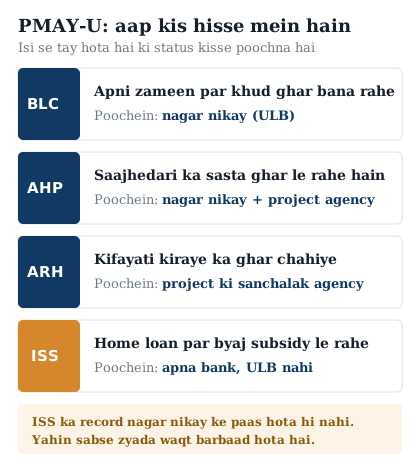
PMAY-U 2.0 एक ही रास्ते से नहीं चलती, इसके चार अलग हिस्से हैं जिन्हें vertical कहा जाता है। आप किस में आते हैं, इसी से तय होता है कि आपका record कहां दिखेगा। यही वजह है कि कई लोग सही portal पर होते हुए भी अपना नाम नहीं ढूंढ़ पाते।
| Vertical | किनके लिए | record कहां रहता है |
|---|---|---|
| BLC, Beneficiary-Led Construction | अपनी ज़मीन पर खुद घर बनाने वाले | Urban local body और portal की beneficiary list |
| AHP, Affordable Housing in Partnership | साझेदारी में बने सस्ते घर लेने वाले | Urban local body और project की सूची |
| ARH, Affordable Rental Housing | किराये के किफ़ायती घर लेने वाले | संबंधित project या संचालक एजेंसी |
| ISS, Interest Subsidy Scheme | होम लोन पर ब्याज सब्सिडी लेने वाले | आपका बैंक या lending institution, ULB नहीं |
अगर आप Interest Subsidy Scheme में हैं तो आपका case urban local body के पास नहीं, आपके होम लोन देने वाले बैंक या housing finance company के पास होता है। इसलिए beneficiary list में नाम न मिलने पर घबराने से पहले अपने बैंक से पूछें, वहीं से subsidy का हिसाब चलता है।
सूची कैसे देखें
- Official PMAY-U portal खोलें और beneficiary search या list वाला हिस्सा ढूंढ़ें।
- अपने नाम और शहर से खोजें, या अपना assessment या application ID डालें।
- अपना record खोलकर आवेदन की स्थिति देखें।
- जो दिखे उसका screenshot रख लें, आगे बात करते समय काम आता है।
बड़े शहर की सूची में सैकड़ों एक जैसे नाम होते हैं, इसलिए सिर्फ़ नाम से ढूंढ़ना मुश्किल हो जाता है। आपका assessment या application ID सीधे आपके record तक पहुंचाता है, इसलिए उसे कहीं लिखकर या उसका screenshot लेकर रख लें।
Record में क्या-क्या दिखता है
- आपका नाम और assessment या application number।
- आवेदन किस चरण पर है, जैसे जांच बाकी है या मंज़ूर हो चुका है।
- किस vertical के तहत आपका case दर्ज है।
- संबंधित शहर या urban local body का नाम।
नाम न मिले तो
नाम न मिलने का मतलब हमेशा यह नहीं होता कि आवेदन नामंज़ूर हो गया। इसकी कुछ आम वजहें हैं, और उन्हें एक-एक करके देख लेना सबसे तेज़ तरीका है।
- आप ISS में हैं, इसलिए आपका record beneficiary list में नहीं बल्कि आपके बैंक के पास है।
- आवेदन अभी verification में है और इसीलिए सूची में नहीं आया।
- record में नाम की spelling आपके सोचे हुए से अलग दर्ज है।
- आपने गलत शहर या गलत urban local body चुनकर खोजा है।
- आवेदन मंज़ूर नहीं हुआ, और इसका कारण urban local body ही बता सकती है।
- पहले assessment या application ID से खोजकर देखें, नाम से नहीं।
- शहर और urban local body दोबारा जांच लें।
- ISS में हैं तो सीधे अपने बैंक या housing finance company से status पूछें।
- BLC या AHP में हैं तो urban local body के दफ़्तर जाकर अपना ID बताकर पूछें।
- जवाब न मिले तो लिखित शिकायत दें और उसकी पावती लेना न भूलें।
Portal पर सूची देखना और urban local body से अपने आवेदन की स्थिति पूछना दोनों मुफ़्त हैं। कोई नाम जुड़वाने या मंज़ूरी दिलाने के पैसे मांगे तो उसे कुछ न दें, यह धोखा है।
हिंदी में
पीएमएवाई-यू लाभार्थी सूची देखने के लिए आधिकारिक पोर्टल पर बेनिफिशियरी सर्च में नाम और शहर डालें, या अपना असेसमेंट आईडी डालें। बड़े शहरों में नाम से ढूंढ़ना मुश्किल होता है, इसलिए आईडी से खोजना ज़्यादा भरोसेमंद है।
ध्यान रखें कि यह योजना चार हिस्सों में चलती है। अगर आप ब्याज सब्सिडी यानी आईएसएस में हैं तो आपका रिकॉर्ड नगर निकाय के पास नहीं, आपके बैंक के पास होता है। इसलिए सूची में नाम न मिलने पर पहले बैंक से पूछें।
नाम न मिलने पर शहर और नगर निकाय दोबारा जांचें, फिर नगर निकाय के दफ़्तर में अपना आईडी बताकर स्थिति पूछें। जवाब न मिले तो लिखित शिकायत दें और पावती लें। यह सब देखना और पूछना नि:शुल्क है।
Frequently asked questions
PMAY-U सूची कैसे देखें?
Official PMAY-U portal पर beneficiary search में अपना नाम और शहर डालकर, या अपना assessment या application ID डालकर देख सकते हैं। ID से खोजना ज़्यादा भरोसेमंद है।
मेरा नाम सूची में नहीं है, क्यों?
हो सकता है आवेदन अभी verification में हो, या आप ISS में हों जहां record बैंक के पास रहता है, या शहर और urban local body गलत चुना गया हो। पहले ये तीनों जांचें, फिर urban local body से पूछें।
PMAY-U 2.0 के चार vertical कौन से हैं?
BLC यानी अपनी ज़मीन पर खुद घर बनाना, AHP यानी साझेदारी में बने सस्ते घर, ARH यानी किफ़ायती किराये के घर, और ISS यानी होम लोन पर ब्याज सब्सिडी। आप किस में आते हैं इसी से तय होता है कि आपका record कहां देखा जाए।
मैं ISS में हूं पर beneficiary list में नाम नहीं है, क्या यह गलत है?
ज़रूरी नहीं। ISS का हिसाब urban local body के बजाय आपके होम लोन देने वाले बैंक या housing finance company के पास रहता है। इसलिए पहले अपने बैंक से status पूछें।
Assessment ID खो गया है, अब क्या करूं?
अपने urban local body के दफ़्तर में जाकर नाम, पता और आवेदन की मोटी जानकारी बताकर पूछें, record वहीं से निकल जाता है। ISS में हैं तो अपने बैंक से पूछें।
सूची देखने या नाम जुड़वाने के पैसे लगते हैं?
बिल्कुल नहीं। सूची देखना और अपने आवेदन की स्थिति पूछना दोनों नि:शुल्क हैं। कोई पैसे मांगे तो यह धोखा है।
This guide explains how to use the official government service. Yojana Disha is not affiliated with the Ministry of Rural Development. Always rely on nrega.dord.gov.in (formerly nrega.nic.in) for official data.